
For the Analyse Webserver Logfile Application (AWL) I wanted to show better information instead of just the Useragent String, because they are a mess and contain confusing information.
As an example look at this Useragent String: Mozilla/5.0 (Macintosh; Intel Mac OS X 10_12_5) AppleWebKit/537.36 (KHTML, like Gecko) Chrome/59.0.3071.109 Safari/537.36
I rather would want to show it like this: Chrome (59) OS X
There are various discussions and blogposts from more knowledgeable people out there, discussing UA and their misinformation. Due to missing regulatory those strings can’t be easily parsed with a regular expression.
Therefor I was falling back to the second best option: invoking a webservice.
After a little research I decided to go with a free webservice provided by UserAgentString.com, where you simply pass an URL encoded UA string.
As you’ve probably seen in my first blogpost for AWL I created a small datamodel to hold UA information in a separate table. That made it easy to set up a maintenance screen to edit the information and provide a more readable alias for it.
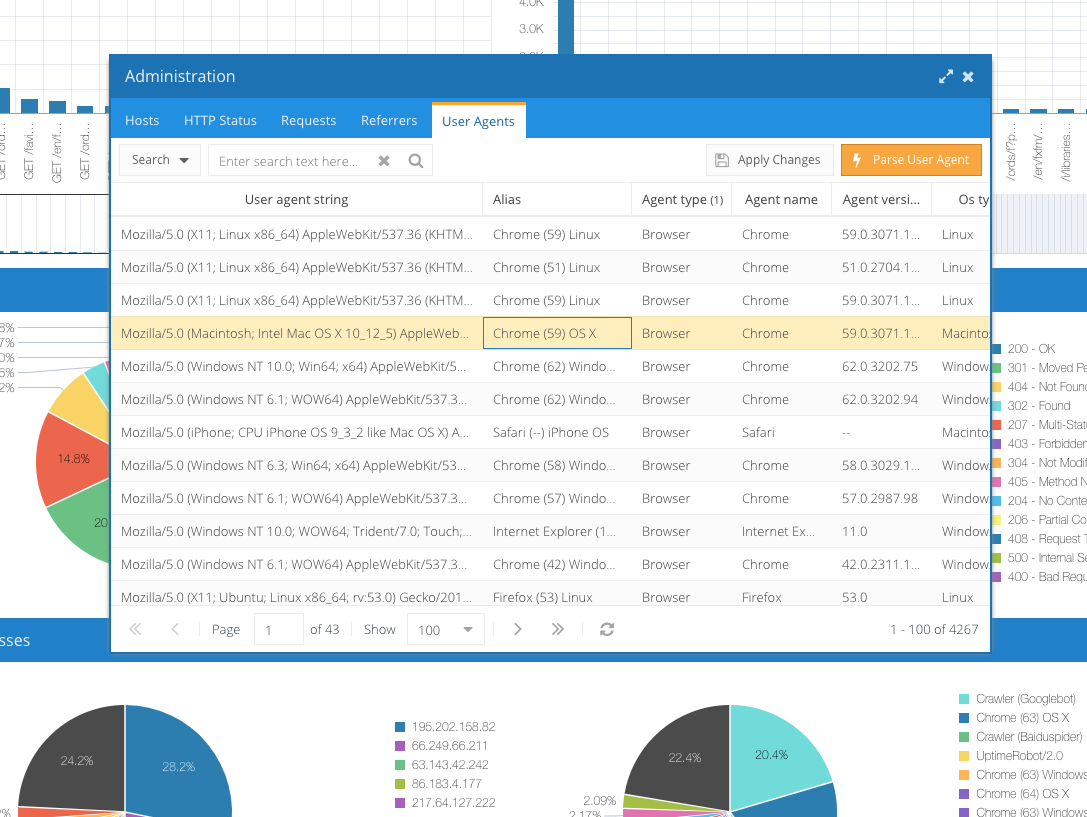
Obviously I didn’t want to manually edit thousands of different UA’s and decided to invoke the webservice through a button click (see button “Parse User Agent” in above screenshot).
Here is the Dynamic Action Code for “Execute PL/SQL Code” triggered by Button click.
BEGIN
    BEGIN
        FOR cUA IN
          ( SELECT ID
                 , AGENT_TYPE
                 , AGENT_NAME
                 , AGENT_VERSION
                 , OS_TYPE
                 , OS_NAME
                 , OS_VERSION_NAME
                 , OS_VERSION_NUMBER
                 , OS_PRODUCER
                 , OS_PRODUCER_URL
                 , LINUX_DISTRIBUTION
                 , AGENT_LANGUAGE
                 , AGENT_LANGUAGE_TAG
              FROM
                 ( SELECT HTTPURITYPE('http://www.useragentstring.com/?uas='||utl_url.escape(USER_AGENT_STRING)||'&getJSON=all').getClob() AS UA_JSON
                        , ID
                     FROM AWL_USER_AGENT
                    WHERE ROWNUM < 100
                      AND AGENT_TYPE IS NULL
                 )
                 , JSON_TABLE
                     ( UA_JSON
                     , '$'
                       COLUMNS
                         ( AGENT_TYPE         VARCHAR2(2000) PATH '$.agent_type'
                         , AGENT_NAME         VARCHAR2(2000) PATH '$.agent_name'
                         , AGENT_VERSION      VARCHAR2(2000) PATH '$.agent_version'
                         , OS_TYPE            VARCHAR2(2000) PATH '$.os_type'
                         , OS_NAME            VARCHAR2(2000) PATH '$.os_name'
                         , OS_VERSION_NAME    VARCHAR2(2000) PATH '$.os_versionName'
                         , OS_VERSION_NUMBER  VARCHAR2(2000) PATH '$.os_versionNumber'
                         , OS_PRODUCER        VARCHAR2(2000) PATH '$.os_producer'
                         , OS_PRODUCER_URL    VARCHAR2(2000) PATH '$.os_producerUrl'
                         , LINUX_DISTRIBUTION VARCHAR2(2000) PATH '$.linux_distribution'
                         , AGENT_LANGUAGE     VARCHAR2(2000) PATH '$.agent_language'
                         , AGENT_LANGUAGE_TAG VARCHAR2(2000) PATH '$.agent_languageTag'
                         )
                     )
          )
        LOOP
            UPDATE AWL_USER_AGENT
               SET AGENT_TYPE         = cUA.AGENT_TYPE
                 , AGENT_NAME         = cUA.AGENT_NAME
                 , AGENT_VERSION      = cUA.AGENT_VERSION
                 , OS_TYPE            = cUA.OS_TYPE
                 , OS_NAME            = cUA.OS_NAME
                 , OS_VERSION_NAME    = cUA.OS_VERSION_NAME
                 , OS_VERSION_NUMBER  = cUA.OS_VERSION_NUMBER
                 , OS_PRODUCER        = cUA.OS_PRODUCER
                 , OS_PRODUCER_URL    = cUA.OS_PRODUCER_URL
                 , LINUX_DISTRIBUTION = cUA.LINUX_DISTRIBUTION
                 , AGENT_LANGUAGE     = cUA.AGENT_LANGUAGE
                 , AGENT_LANGUAGE_TAG = cUA.AGENT_LANGUAGE_TAG
             WHERE ID = cUA.ID
            ;
        END LOOP;
    EXCEPTION
        WHEN OTHERS THEN
            APEX_DEBUG.ERROR(Utl_Http.get_detailed_sqlcode  || Utl_Http.Get_Detailed_Sqlerrm);
            APEX_DEBUG.ERROR(DBMS_UTILITY.FORMAT_ERROR_BACKTRACE);
    END;
    --
    -- try to make it prettier to read the UA agent and construct an Alias (can be changed in admin section)
    UPDATE AWL_USER_AGENT
       SET ALIAS = SUBSTR(DECODE
                     ( AGENT_TYPE
                     , 'unknown', AGENT_TYPE||' ('||USER_AGENT_STRING||')'
                     , 'Crawler', AGENT_TYPE||' ('||AGENT_NAME||')'
                     , 'Browser', AGENT_NAME||' ('||REGEXP_REPLACE(AGENT_VERSION,'(\d*)\.(\d*)(.*)','\1')||') '||OS_NAME
                     , USER_AGENT_STRING
                     ),1,100)
     WHERE ALIAS      IS     NULL
       AND AGENT_TYPE IS NOT NULL
    ;
END;
Let’s look at the sourcecode in a bit more detail to see whats what:
- Line 18 invokes the webservice through HTTPURITYPE. The webservice itself returns data in JSON format, HTTPURITYPE passes this back as a CLOB
- Line 18-22 loops through our useragent table for the first 100 (99) unprocessed records
- Line 24-39 converts the JSON-CLOB to a JSON_TABLE which we can select from just as if it would be a regular database table
- Line 44-57 updates the useragent table with the received information
- Line 67-76 now calculates an alias out of the given information. The only reason why this is done outside of the loop is that it was added at a later time and is meant to process also older records
Luckily the webservice is available through http, that means no certificate or wallet is needed.